AI ของคุณ กฎของคุณ
- Added a bundled
llama.cppcompletion provider profile forqwen3-35b-a3b, including configurable endpoint, sampling, token, penalty, and streaming defaults - Added an Ollama Cloud category in the Models library and model selector, backed by Ollama's dedicated cloud listing
- Added custom accent selection in Appearance with violet, blue, cyan, teal, emerald, amber, rose, slate, and custom color options
- Added runtime-generated accent shade scales so custom accents can drive buttons, links, focus rings, sliders, progress bars, selected states, and glow shadows
- Reworked Tailwind theme tokens to use CSS variables for
primaryandaccent, with generated custom palettes meeting white-text contrast targets - Refined light and dark neutral palettes to reduce glare while preserving contrast across app backgrounds, panels, inputs, and message surfaces
- Persisted accent preferences through frontend state, backend preferences, import/export defaults, local rehydration, logout cleanup, and demo mode
- Added accent translation keys across all supported locales and verified locale key parity against English
- Expanded demo-mode preference APIs so Appearance, generation, embedding, system-message, and default-model settings can be exercised without a backend connection
- Standardized the Libre WebUI wordmark through a shared
Logocomponent across loading, login, setup, sidebar, and settings surfaces - Replaced fixed violet styling in persona adaptive-learning controls with active-accent tokens
- Recolored Ollama library and Cloud badges from cyan to the design-system info-blue treatment
- Reduced noisy debug logging across optional auth, chat, document search, plugin lookup, plugin deletion, TTS, image generation, and WebSocket auth paths
- Returned package version in auth system info for UI/version display
- Updated Dependabot targeting to
mainand ignored incompatible Electron and ESLint major bumps until their upstream compatibility gaps are resolved
- Fixed a critical app-wide
Too many re-renderscrash inSettingsModalby memoizing image-generation model/plugin arrays - Fixed Ollama Cloud model pulls by tagging cloud library results with
:cloudbefore install/run actions - Fixed Ollama Cloud generation failures by stripping unsupported non-positive
num_predictvalues before cloud requests - Fixed cloud model pull functionality
- Fixed auto-title generation for persona/current-model workflows by resolving the real running model before sending title prompts
- Quietly handles expired or invalid JWTs in auth and WebSocket flows without dumping routine stack traces
- Kept the lint toolchain on ESLint 9 for compatibility with the current React plugin stack
- Expanded
DESIGN.mdwith custom accent presets, generated shade-scale behavior, token usage rules, light/dark neutral guidance, and contrast requirements
- Bumped package versions to
0.10.0 - Updated Electron to
41.7.1and Electron Builder to26.15.2 - Bumped frontend/backend dependencies including React Query, i18next, KaTeX, lucide-react, React Router, Vite, pdfjs-dist, TypeScript tooling, Tailwind Merge, Zustand, Express, Multer, Better SQLite3, and related lockfile entries
- Remediated npm security advisories through dependency and lockfile updates, including
qs,tmp,ip-address,brace-expansion,ws, and related transitive packages
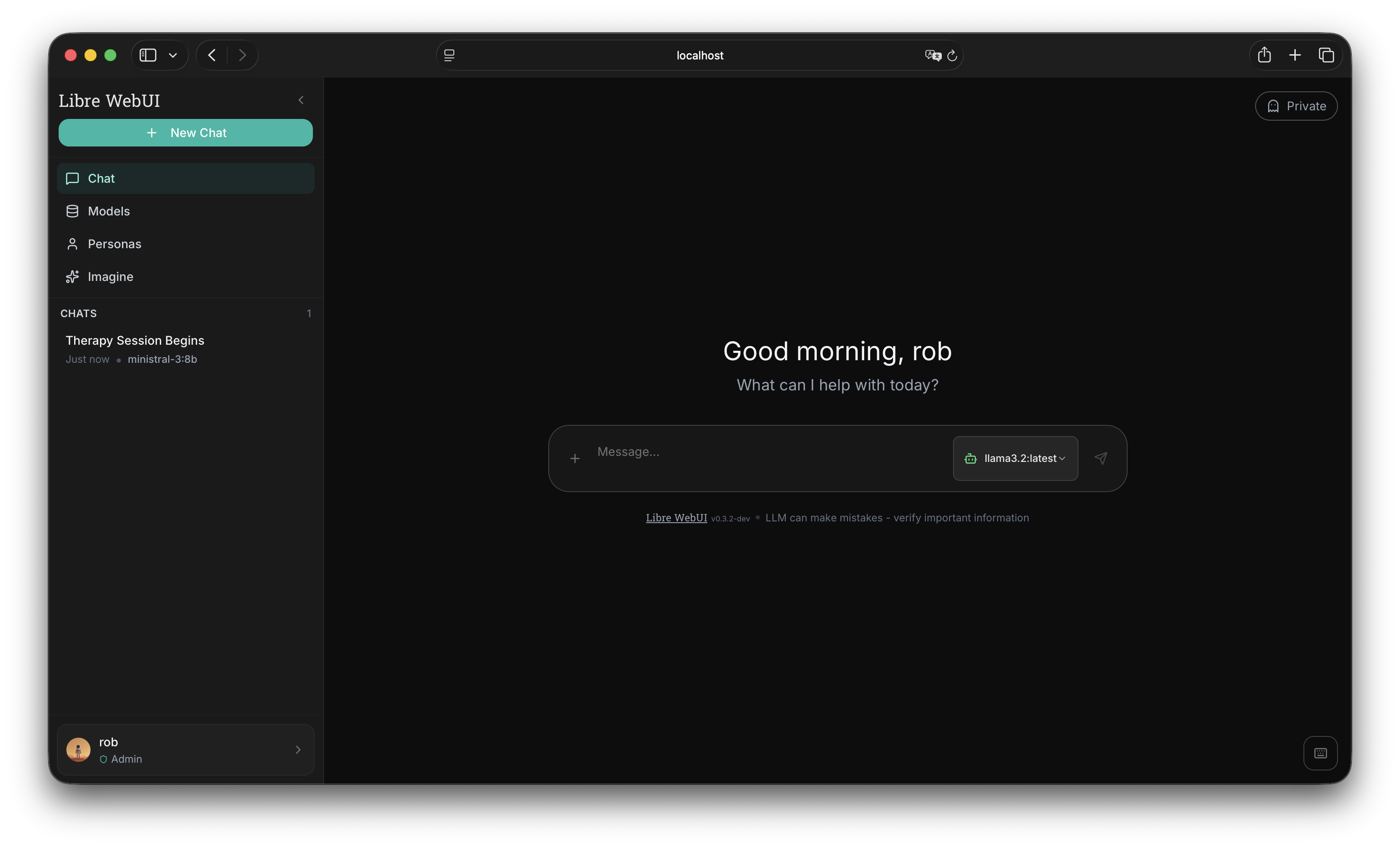
อินเทอร์เฟซแชท AI ที่ให้ความสำคัญกับความเป็นส่วนตัว รันในเครื่องด้วย Ollama หรือเชื่อมต่อ OpenAI, Anthropic และผู้ให้บริการ 9+ ราย ไม่มีการเก็บข้อมูล ไม่มีการติดตาม
npx libre-webui ต้องการ Node.js 18+ และ Ollama สำหรับ AI ในเครื่อง
ทุกอย่างที่คุณต้องการ
โซลูชันแชท AI ที่ครบครันและเคารพความเป็นส่วนตัวของคุณ
Artifacts แบบโต้ตอบ
แสดง HTML, SVG และ React components โดยตรงในแชท ดูตัวอย่างสดพร้อมโหมดเต็มหน้าจอ
AI ในเครื่อง & คลาวด์
รันโมเดลในเครื่องด้วย Ollama หรือเชื่อมต่อ OpenAI, Anthropic, Groq, Gemini, Mistral และอื่นๆ ทางเลือกของคุณ
แชทเอกสาร (RAG)
อัปโหลด PDF, เอกสาร และไฟล์ข้อความ ถามคำถามเกี่ยวกับเอกสารด้วยการค้นหาเชิงความหมายและ vector embeddings
Artifacts แบบโต้ตอบ
แสดง HTML, SVG และ React components โดยตรงในแชท ดูตัวอย่างสดพร้อมโหมดเต็มหน้าจอ
เข้ารหัส AES-256
การเข้ารหัสระดับองค์กรสำหรับข้อมูลทั้งหมด ประวัติแชท, เอกสาร และการตั้งค่าถูกเข้ารหัสเมื่อจัดเก็บ
บุคลิกที่กำหนดเอง
สร้างบุคลิก AI ที่มีพฤติกรรมเฉพาะและ system prompts นำเข้า/ส่งออกบุคลิกเป็น JSON
แปลงข้อความเป็นเสียง
ฟังคำตอบ AI ด้วยตัวเลือกเสียงหลากหลาย รองรับ TTS ของเบราว์เซอร์และการผสาน ElevenLabs
สร้างภาพ
สร้างภาพด้วย ComfyUI และโมเดล Flux หลายขนาด พรีเซ็ตคุณภาพ และการผสานรวมกับแชทอย่างราบรื่น
ตัวแปรปลั๊กอิน
การตั้งค่าที่กำหนดได้สำหรับแต่ละปลั๊กอิน เช่น อุณหภูมิ เอนด์พอยท์ และโทเค็น ค่าที่ละเอียดอ่อนจะถูกเข้ารหัสเมื่อจัดเก็บ
ปุ่มลัด
ปุ่มลัดสไตล์ VS Code สำหรับผู้ใช้ขั้นสูง นำทาง, สลับการตั้งค่า และควบคุมทุกอย่างจากคีย์บอร์ด
รองรับหลายผู้ใช้
การควบคุมการเข้าถึงตามบทบาทพร้อม SSO OAuth GitHub และ Hugging Face ในตัว
เชื่อมต่อกับผู้ให้บริการใดก็ได้
อินเทอร์เฟซเดียว ความเป็นไปได้ไม่จำกัด
เริ่มต้นในไม่กี่วินาที
เลือกวิธีการติดตั้งที่คุณต้องการ
สร้างปลั๊กอินที่กำหนดเอง
เชื่อมต่อ LLM ที่เข้ากันได้กับ OpenAI ด้วยไฟล์ JSON ง่ายๆ
ปลั๊กอินที่มี
ปลั๊กอินอย่างเป็นทางการจาก repository Libre WebUI คลิกเพื่อดูหรือดาวน์โหลด
{
  "id": "custom-model",
  "name": "Custom Model",
  "type": "completion",
  "endpoint": "http://localhost:8000/v1/chat/completions",
  "auth": {
    "header": "Authorization",
    "prefix": "Bearer ",
    "key_env": "CUSTOM_MODEL_API_KEY"
  },
  "model_map": [
    "my-fine-tuned-llama"
  ],
  "variables": [
    {
      "name": "temperature",
      "type": "number",
      "label": "Temperature",
      "default": 0.7,
      "min": 0, "max": 2
    }
  ]
}
สร้างปลั๊กอินของคุณเอง
เริ่มเซิร์ฟเวอร์ LLM
รันเซิร์ฟเวอร์ที่เข้ากันได้กับ OpenAI: llama.cpp, vLLM, Ollama หรือเซิร์ฟเวอร์ FastAPI ที่กำหนดเอง
สร้าง Plugin JSON
กำหนด endpoint, การยืนยันตัวตน และโมเดลที่มีในไฟล์ JSON ง่ายๆ
อัปโหลดไปยัง Libre WebUI
ไปที่ การตั้งค่า > ผู้ให้บริการ อัปโหลดปลั๊กอินและใส่ API key
เริ่มแชท
โมเดลที่กำหนดเองปรากฏในตัวเลือกโมเดล ความเป็นส่วนตัวเต็มที่ การควบคุมเต็มที่
อ้างอิงฟิลด์ปลั๊กอิน
id ตัวระบุที่ไม่ซ้ำ (ตัวพิมพ์เล็ก อนุญาตขีดกลาง) name ชื่อที่แสดงใน UI type "completion" สำหรับแชท, "tts" สำหรับแปลงข้อความเป็นเสียง endpoint URL API (เช่น /v1/chat/completions) auth.header ชื่อ header ยืนยันตัวตน (Authorization, x-api-key) auth.prefix คำนำหน้า key ("Bearer " หรือว่าง) auth.key_env ตัวแปรสภาพแวดล้อมสำหรับ API key model_map อาร์เรย์ของตัวระบุโมเดลที่มี variables การตั้งค่าที่กำหนดได้ (อุณหภูมิ, เอนด์พอยท์ ฯลฯ) พร้อมที่จะเป็นเจ้าของ AI ของคุณ?
เข้าร่วมกับผู้ใช้หลายพันคนที่ให้ความสำคัญกับความเป็นส่วนตัวและการควบคุม